
a-blog cmsで、音楽ファイル(mp3、m4a)のカスタムユニットを作成したい。
管理画面側
/theme_name/admin/entry/unit/extend.html
<!-- BEGIN custom_audio -->
<table class="entryFormColumnSettingTable entryFormColumnTable {diff}">
  <tr>
    <td class="entryFormFileControl">
      <table>
      <!-- BEGIN_IF [{audio-file@path}/nem] -->
      <tr>
        <th>試聴</th>
        <td>
          <audio src="%{ARCHIVES_DIR}{audio-file@path}" controls preload="metadata" style="width:100%;"></audio>
        </td>
      </tr>
      <!-- END_IF -->
      <tr>
        <th><label for="unit-audio-file-{id}">音楽ファイル</label></th>
        <td>
          <!-- BEGIN_IF [{audio-file@path}/nem] -->{audio-file@fileSize}[convert_bytes('m',1)] MB
          <input type="hidden" name="audio-file{id}@old" value="{audio-file@path}" />
          <input type="hidden" name="audio-file{id}@secret" value="{audio-file@secret}" />
          <input type="hidden" name="audio-file{id}@fileSize" value="{audio-file@fileSize}" />
          <label for="input-checkbox-audio-file{id}@edit" class="acms-admin-form-checkbox">
            <input type="checkbox" name="audio-file{id}@edit" value="delete" id="input-checkbox-audio-file{id}@edit" />
            <i class="acms-admin-ico-checkbox"></i>削除</label>
          <!-- END_IF -->
          <input type="file" name="audio-file{id}" id="unit-audio-file-{id}" accept=".mp3,.m4a,audio/mpeg,audio/mp4,audio/x-m4a" />
          <input type="hidden" name="unit{id}[]" value="audio-file{id}" />
          <input type="hidden" name="audio-file{id}@baseName" value="{audio-file@baseName}" />
          <input type="hidden" name="audio-file{id}:extension" value="file" />
<select name="audio-file{id}@extension" style="margin-top:4px;">
  <option value="mp3" {audio-file@extension:selected#mp3}>mp3</option>
  <option value="m4a" {audio-file@extension:selected#m4a}>m4a</option>
</select>
          <p style="margin:4px 0 0; font-size:12px;">対応形式:mp3 / m4a</p>
        </td>
      </tr>
      <tr>
        <th><label for="unit-audio-title-{id}">曲名</label></th>
        <td>
          <input type="text" name="audio-title{id}" value="{audio-title}" id="unit-audio-title-{id}" class="acms-admin-form-width-full" placeholder="(任意)" />
          <input type="hidden" name="unit{id}[]" value="audio-title{id}" />
        </td>
      </tr>
      <tr>
        <th><label for="input-checkbox-audio-download-ng-{id}">ダウンロード</label></th>
        <td>
          <div class="acms-admin-form-checkbox">
            <input type="checkbox" name="audio-download{id}[]" value="ng" {audio-download:checked#ng} <!-- BEGIN_IF [{audio-file@path}/em] --> checked="checked"<!-- END_IF --> id="input-checkbox-audio-download-ng-{id}" />
            <label for="input-checkbox-audio-download-ng-{id}">
              <i class="acms-admin-ico-checkbox"></i>不可</label>
          </div>
          <input type="hidden" name="unit{id}[]" value="audio-download{id}" />
        </td>
      </tr>
      </table>
    </td>
  </tr>
</table>
<!-- END custom_audio -->
表示側
/theme_name/include/unit/extend.html
<!-- BEGIN unit#custom_audio -->
<!-- BEGIN_IF [{audio-file@path}/nem] -->
<div class="column-audio"{display_size}[raw]>
  <!-- BEGIN_IF [{audio-title}/nem] --><p class="column-audio-title">{audio-title}</p><!-- END_IF -->
  <audio src="%{ARCHIVES_DIR}{audio-file@path}" controls preload="metadata"
    <!-- BEGIN_IF [{audio-download}/eq/ng] -->controlslist="nodownload" oncontextmenu="return false;"<!-- END_IF -->
    style="width:100%;">
    お使いのブラウザは音声の再生に対応していません。
  </audio>
  <!-- BEGIN_IF [{audio-download}/neq/ng] -->
  <p class="column-audio-download">
    <a href="%{ARCHIVES_DIR}{audio-file@path}" download>音楽ファイルをダウンロード({audio-file@fileSize}[convert_bytes('m',1)] MB)</a>
  </p>
  <!-- END_IF -->
</div>
<!-- END_IF -->
<!-- END unit#custom_audio -->
ファイルサイズ上限の確認
PHP のアップロード上限(upload_max_filesize と post_max_size)の確認。
○ 小さいファイルは保存できて、大きいファイルだけ消える場合は、サイズ上限が原因。
※ サーバーの php.ini か .htaccess で上限を引き上げてください。
○ 小さいファイルでも消える場合は、拡張子の問題が考えられる。
※ a-blog cmsの管理画面・編集画面設定の「アップロード許可ファイル拡張子にm4aはないので、追記する必要がある。
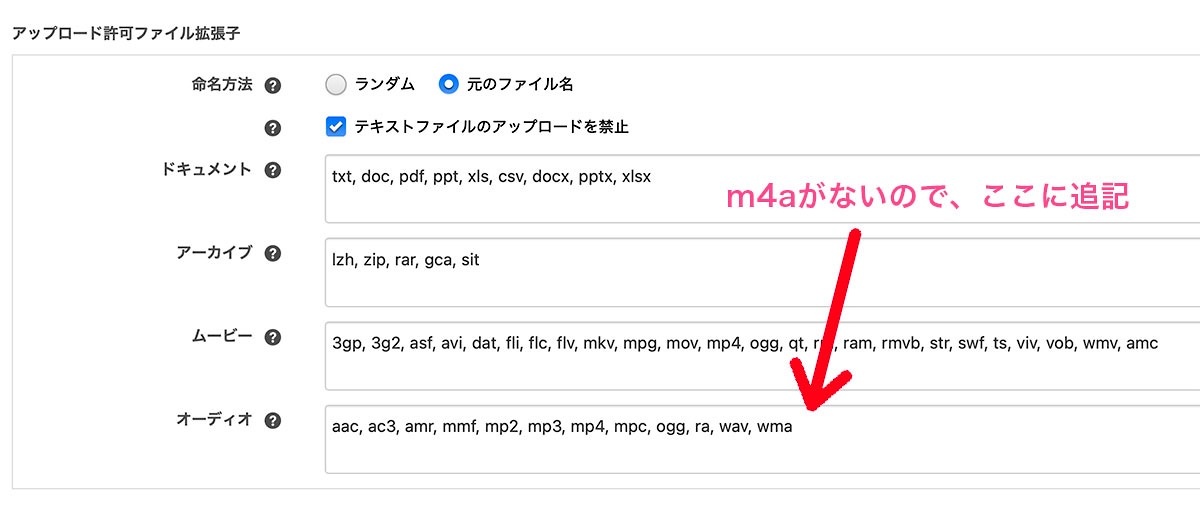
a-blog cms の設定ファイルの確認
上限を確認する方法
themes/テーマ名のフォルダ直下(index.php と同じ場所)に、info.php という名前でファイルを作り、次の1行だけを書く。
<?php phpinfo(); ?>
ブラウザで http://(サイトのドメイン)/info.php を開き、下記の項目を確認する。
upload_max_filesize
post_max_size
Loaded Configuration File
目安としてupload_max_filesize を 20M、post_max_size を 25M 程度にしておけば、1曲分の mp3 や m4a なら十分。
確認が終わったら、info.php は削除する。
※ サーバーの内部情報が丸見えになるため、公開サーバーに置いたままにするのは危険だから。
投稿:2026年9月24日
シンガープロ 安藤秀樹
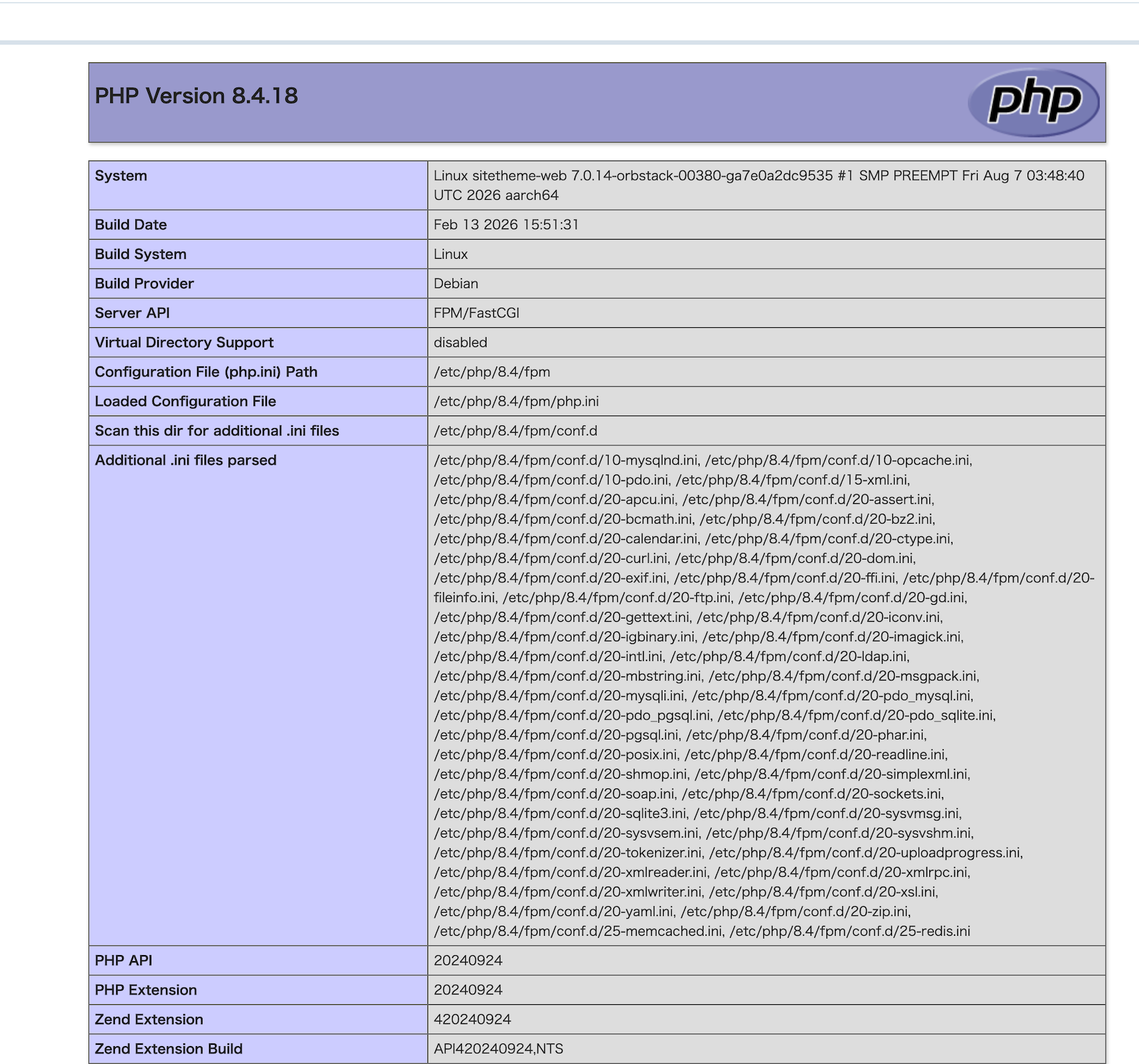
info.phpで確認